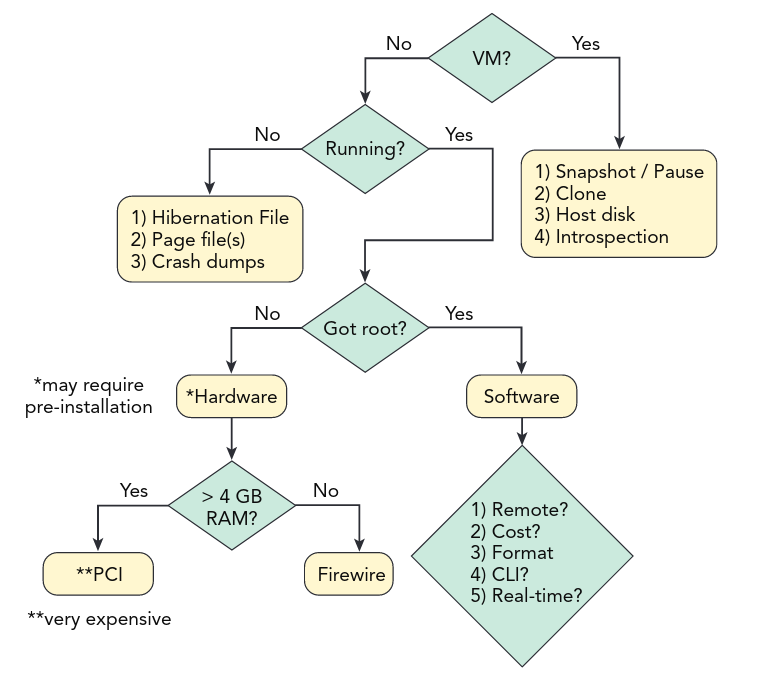
- Remote versus local
- Do you have physical access to the target system? A case can quickly become complicated if the computer is located in another country.
- Cost
- Do you have budgetary restrictions on the acquisition software you can buy?
- Format
- Do you require memory in a specific file format?
- CLI versus GUI
- Acquisition versus runtime interrogation
- Is a full memory dump needed or just a dump of running processes, network and so on?
Risk
If the target is a mission-critical system that can be shut down or rebooted only in extreme circumstances, you must be prepared to justify why acquiring memory is vital to the investigation. Sometimes the consequences of destabilizing a system are never worth the risk.
It is important that the person who will bear the consequences of the risks is fully informed before the risks are assumed.
Removable Media
Never plug possible infected removable media directly into your forensic workstation. Use a "sacrificial" system and inspect it then copy the evidence to your forensic workstation over an isolated network.
Always secuerly erease removable media before using it to acquire evidence.
VMware
- Suspend/Pause or create a snapshot of the vm.
Sometimes the memory is entirely contained in a single .vmem file. In other cases,
instead in a .vmsn (snapshots) or .vmss (saved state).
QEMU
Dumps can be created by using the virsh command.
Hyper-V
- Save the VM's state or create a snapshot
- Recover the
.bin(physical memory chunks) and.vsv(metadata)
Volatility does not support hyper-v memory formats atm so we have to use vm2dmp
Memory from running hyper-v vms can be acquired using Sysinternals LikeKD.
Converting
- MoonSols Windows memory Toolkit: Allows convertion of hibernation and crash raw into crash dumps.
- vmss2core:
.vmsninto crashdumps - Volatility imagecopy: copy out raw memory dumps (VMware, Virtbox, qemu, firewire, ewf...)
Memory on Disk
Hibernation File
mmls image.dd
Get the Start sector of the NTFS / main paritition and use fls from SLEUTH.
Example: 2048
fls -o 2048 image.dd | grep hiber
r/r 36218-128-1: hiberfil.sys
The inode 36218 can now be used to extract the file with icat:
icat -o 2048 image.dd 36218 > /media/external/hiberfil.sys
Page File
Location: C:\pagefile.sys
It is possible that the machine has more than only one pagefile.
This can be determined by querying the registry:
reglookup -p "ControlSet001/Control/Session Manager/Memory Management" -t MULTI_SZ SYSTEM
It can be recovered the same way again.
fls -o 2048 image.dd | grep hiber
r/r 58981-128-1: pagefile.sys
And get it with
icat -o 2048 image.dd 58981 > /media/external/pagefile.sys
Using yara rules and page_brute we can filter for certain artifacts.
Encrypted Page files
Windows: fsutil behavior query EncryptedPagingFile